
When the Scammer Sounds Like Someone You Know
A familiar voice or convincing email is no longer enough. Learn a few verification habits, protect your accounts, and make a simple family plan for urgent requests.
About 6 minutes to read

Imagine getting a call from someone who sounds exactly like your daughter. She needs money urgently. You recognize the voice, and your first instinct is to help.
That familiar voice is no longer enough to establish who is calling. AI can imitate a person from a short recording, including one posted online. The U.S. Federal Trade Commission has warned about this.
For those of us in our 60s, 70s and beyond, this is worth understanding without allowing it to take over our lives. We have people to talk to, things to learn and plans to make. A few deliberate habits can help us keep doing all of that.
Three examples worth paying attention to
In June 2025, the Canadian Anti-Fraud Centre and Canadian Centre for Cyber Security warned about a campaign impersonating senior government officials. Criminals sent malicious links and urgent financial requests to business executives and public officials. In some cases, AI imitated the officials’ voices. These were people accustomed to handling important requests. The familiar name and voice were part of the trap.
On September 22, 2026, Microsoft reported disrupting a service called EvilTokens. According to Microsoft, it had been linked to more than 12,000 compromised email inboxes worldwide, including activity in Canada and the United States. Its AI tools could examine stolen inboxes, identify trusted relationships and payment conversations, and help draft messages impersonating the right person.
Think about what that means. A fraudulent email might refer to a real conversation or a payment you actually expect.
I personally fell prey to this form of scam when I received an e-greeting card from a friend who had actually sent me a valid one the year before! Their own email was hacked and sent me an email. I opened the email and clicked on the link to open the greeting card - and a virus was downloaded that infiltrated my computer and ran up charges on one of my accounts. I was able to get them all reversed, but I had to entirely wipe my computer and start over - many hours lost.
In another example, in August 2025, Anthropic, the company behind Claude, reported an AI-assisted data-theft and extortion operation. The criminal targeted at least 17 organizations, including healthcare, emergency services and religious institutions. Anthropic said its tools had been misused to help penetrate networks, assess stolen information and prepare extortion demands.
These cases show several ways AI can help criminals: imitate someone, make sense of stolen information, and carry out parts of a cyberattack. A person does not have to use AI themselves to be affected.
Make verification a habit
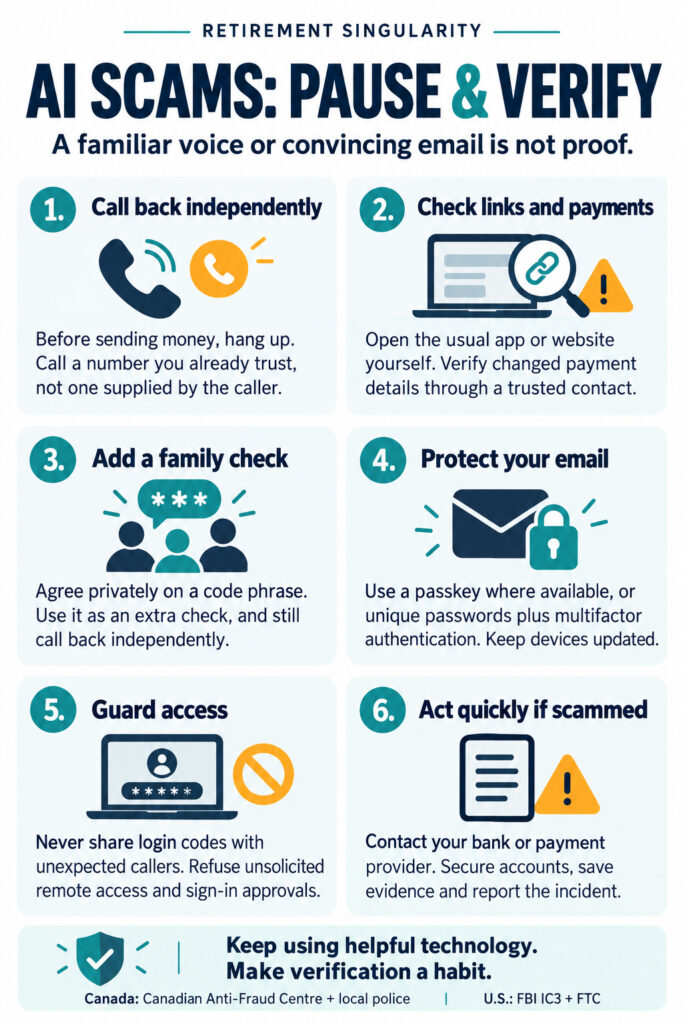
The practical rule is simple: never send money based on an urgent call alone. Hang up and call back using a number that you already trust.
Use the number already saved for your family member, or the number on your bank card or statement. A number supplied by the caller, or displayed by caller ID, can mislead you. If you cannot reach your relative, try another family member before acting. FTC guidance
Apply the same habit to an email requesting a changed payment destination. Open the organization’s usual app or use an independently verified contact. Replying to the suspicious message only keeps you in the same conversation.
A family code phrase can add another check. Agree on it privately, and keep it out of public posts. Treat it as an extra precaution, since any secret can be exposed. Continue to call them back independently before sending money. The FBI recommends a family phrase and also warns that criminals use AI-generated video. Seeing a face on a screen is no guarantee either.
And give yourself permission to slow down. You can say, “I’ll check and call you back.” You owe an unexpected caller very little.
A family verification plan to save or print
Download the family scam-verification plan (PDF, 1 page). Free to print and share. No signup needed.
One step this week: Agree with someone close to you that an urgent request for money always gets an independent callback.
- Pause the conversation. Do not send money while someone is pressuring you.
- Call the person on a number you already know. If you cannot reach them, contact another trusted family member.
- Agree privately on a family code phrase as an extra check. Still make the independent callback.
- Never share an account sign-in code with an unexpected caller.
Write down the trusted person and callback number somewhere you can find them easily. Use Print above to keep this article, or Email to share the plan with your family.
Based on the FTC’s independent-callback guidance and the FBI’s advice on AI-enabled fraud.
Protect the accounts behind the conversations
Start with your email. It holds correspondence that could help someone impersonate you or people you trust.
Where available, consider a passkey, which lets you sign in using a device and a fingerprint, face scan or PIN. Passkeys help protect against fake sign-in pages, although they cannot prevent every kind of account compromise. The Canadian Cyber Centre explains the benefits and limits.
For accounts that still use passwords, choose a different strong password for each, use a password manager, and turn on multifactor authentication, an extra sign-in check. Keep your phone, computer and apps updated. These basic security steps remain useful even as the scams become more elaborate.
Never read an account login code to an unexpected caller or approve a sign-in you did not initiate. A request to “help secure your account” can be the attempt to enter it. FTC guidance on verification codes
Do not let an unsolicited “technical support” caller take remote control of your computer. If something needs attention, contact a support service you know through its official channels. FTC guidance on support scams
If something has already happened
Act promptly. Contact your bank or payment provider through a trusted number and ask whether a payment can be stopped or recalled. Recovery is not guaranteed. Save the messages and transaction details, and use the affected service’s official recovery process to secure your accounts.
Report the incident to local police and the Canadian Anti-Fraud Centre, or, in the United States, the FBI’s IC3 and the FTC. Tell someone you trust. Embarrassment should never keep you from getting help. The responsibility belongs to the person who deceived you.
Keep the useful parts
AI’s useful capabilities are advancing. Tools that can help us understand information, write clearly or tackle computer tasks can also give bad actors more reach and skill.
Closing everything down would cost us too much. We can keep learning, stay connected and use the tools that help us. Add a pause when money or account access is involved, or you are asked to click on a suspicious link. Strengthen the accounts you rely on, and make that independent callback a habit.
There is still plenty worth answering the email or phone call for.
Play safe!
Michael
AI brings useful possibilities and new risks. In my free weekly RS Briefing, I look at developments in AI, healthy longevity and retirement, and what they could mean for our everyday lives.
Includes new blog alerts. Unsubscribe anytime.